Let's be honest: inconsistent file naming in P&C claims is more than just a pet peeve. It's a direct hit to your bottom line. When every adjuster, admin, and partner has their own "system," you're not just creating clutter—you're actively inflating your cost-per-claim through wasted time, compliance headaches, and settlement delays.
Getting your file naming in order isn't an IT chore. It’s a core business strategy.
The Hidden Costs of Disorganized Claim Files
That sinking feeling of staring at a digital mess of claim files is all too familiar in the P&C world. This chaos isn't just sloppy housekeeping; it’s a financial leak that quietly drains profitability from every single claim you handle. When file names are an afterthought, your entire workflow pays the price.
Think about an adjuster scrambling to find a specific roof photo after a major hailstorm. Is it named IMG_5043.jpg, roofpic.jpg, or maybe Final_Photo_2.jpg? Every minute they spend hunting through hundreds of generic files is a minute they aren't spending on assessing damage, talking to the policyholder, or moving the claim toward settlement. Across a team with heavy caseloads, that wasted labor adds up fast.

The financial damage from poor file naming is tangible and significant. The chaos introduces friction at every stage of the claim lifecycle, creating direct and indirect costs that are often overlooked until it's too late.
The High Cost of Disorganized Claim Files | ||
|---|---|---|
Operational Challenge | Direct Business Impact | Estimated Cost / Delay |
Searching for specific photos, forms, or invoices | Increased adjuster and admin labor costs; non-value-added work | Teams waste up to 20% of their time searching for files |
Inability to quickly locate key evidence for triage or review | Delayed cycle times and slower settlement negotiations | Contributes to $5.2 billion in extended settlement costs annually |
Difficulty proving file history or locating documents during an audit | Increased compliance risk, potential fines, and frantic manual effort | Adds hours or days to audit preparation time |
A single misnamed file halting a workflow | Operational bottlenecks that stall team productivity | Can delay a single claim’s progress by 24-48 hours |
This disorganization quickly spirals. Studies show teams can waste up to 20% of their time just hunting for misplaced documents. Without a standard format like ClaimID_YYYYMMDD_DocumentType_Version.pdf, files essentially become invisible, contributing to industry-wide delays that cost insurers an estimated $5.2 billion annually.
The real cost of a bad file name isn't the few seconds it takes to create it. It's the cumulative hours lost by everyone who has to find, verify, and use that file over the claim's entire lifecycle.
From Chaos to Control
The fix is to treat file naming with the seriousness it deserves: as a foundational business process. By creating and, more importantly, enforcing a clear, logical naming convention, you build a system that organizes itself.
Every single document, from the first notice of loss to the final invoice, becomes instantly identifiable and searchable. This simple shift transforms your digital records from a frustrating liability into a powerful strategic asset.
This structured approach is no longer optional for modern claims management. It sets the stage for powerful automation and AI that can dramatically accelerate your operations.
For example, a platform like Wamy depends on these conventions to automatically categorize evidence, flag missing documents, and serve up instant insights. A well-named file becomes an intelligent data point. You can learn more in our guide on how automating insurance claims processing can dramatically cut costs.
Ultimately, a standardized system means your claims decisions aren't just faster—they're more confident and completely audit-ready. This is how leading P&C carriers turn a simple operational policy into a true competitive advantage, driving down cost-per-claim and boosting team efficiency.
Creating Your Claims Naming Token Taxonomy
Your file naming system needs to be a universal language for the entire claims department. When everyone speaks it fluently, documents become instantly understandable and searchable. The key is creating a token taxonomy—a system where each part of a file name is a specific, meaningful piece of data.
This moves you away from random, one-off file names and toward a predictable, information-rich format. By breaking down a file name into its core components, or "tokens," you build a solid foundation for both organization and automation.
The Anatomy of a Perfect File Name
A strong naming convention is built from a few key tokens, each answering a critical question about the document. Think of them as building blocks. When you combine them in a consistent order, they create a self-describing file name that anyone can understand at a glance.
The core tokens for any P&C claims file should include:
Claim Identifier: The unique ID number for the claim. This is the primary key linking every document to the correct file.
Date: The date the document was created or received. Always use the YYYY-MM-DD format to ensure files sort chronologically by default.
Document Type: A short, standard code for the document type (e.g., PHOTO, INVOICE, RPT for report, STMT for statement).
Subject Matter: A brief, descriptive keyword about the content (e.g., Roof-Damage, Witness-Johnson, Engine).
Version Number: Essential for tracking revisions of documents like estimates or reports (e.g., v1, v2, v03).
This structured approach is now a gold standard, influenced by practices in other data-heavy fields. For instance, the NIH Data Management Policy now requires standardized naming for federally funded research. Data from Stanford University guides confirms that using formats like YYMMDD improved retrieval speed by 40% in collaborative research settings. You can find more detail on how governmental bodies approach data file naming conventions for major information releases.
Building Your Token Dictionary
To make sure everyone uses these tokens correctly, you have to create a clear "taxonomy guide" or dictionary. This is a living document that defines each token, specifies the format, and gives clear examples. It gets rid of ambiguity and becomes the single source of truth for your team.
For example, your guide might define the Document Type token with a specific list of abbreviations:
Document Type | Abbreviation | Description |
|---|---|---|
Photograph | PHOTO | Digital images of damage or evidence. |
Invoice | INV | Invoices from vendors or contractors. |
Estimate | EST | Repair or replacement cost estimates. |
Recorded Statement | AUDIO | Audio files of witness or policyholder statements. |
Police Report | RPT-POL | Official reports filed by law enforcement. |
Medical Record | REC-MED | Medical documentation related to an injury. |
This dictionary is the cornerstone of your file naming conventions. It has to be easily accessible to everyone in the claims process—from adjusters and admins to third-party partners and litigators.
A token taxonomy isn't just about organizing files for today. It's about future-proofing your data, ensuring every file remains searchable, understandable, and valuable for years to come.
Putting It All Together With Real-World Examples
Once your tokens are defined, you can build clear, consistent file names for any scenario. The goal is to make the file's content obvious without ever needing to open it.
Consider a simple auto glass claim: ACME-98765_2026-08-21_PHOTO_Windshield-Chip_v1.jpg ACME-98765_2026-08-22_INV_Glass-Pros-LLC_v1.pdf
Now, imagine a more complex commercial liability case: XYZ-11223_2026-09-15_RPT-POL_Incident-Report_v1.pdf XYZ-11223_2026-09-18_AUDIO_Witness-Statement-ASmith_v1.mp3 XYZ-11223_2026-09-20_EST_Structural-Engineers-Inc_v2.pdf
In each case, the file name tells a story. It instantly connects the document to a claim, places it chronologically, identifies its type, describes the content, and notes the version. This level of detail is especially critical when dealing with digital forms and submissions, a topic you can dive into in our comprehensive guide to AI intake forms.
By establishing and documenting this token taxonomy, you give your team a shared digital language. This paves the way for faster triage, simpler audits, and more efficient claims handling across the board.
From Theory to Action: Naming Templates for Real-World Claim Documents
A token taxonomy is a great starting point, but its real power is unlocked when you turn it into a set of simple, copy-and-paste templates for your team. The objective is to take all the guesswork out of naming files, creating a predictable system for every document your team touches.
This isn't just about keeping your digital files tidy. It’s about building speed and trust directly into your operations. When every file follows a logical pattern, an adjuster, a subrogation specialist, or a legal partner can find exactly what they need in seconds. That speed is what accelerates triage, makes audits painless, and turns your claim file into an irrefutable record of fact.
The Ground Rules for File Naming
Before we get to specific templates, let's establish a few hard-and-fast rules. Following these will prevent a world of technical headaches, from corrupted files to documents that simply vanish across different systems.
Always use hyphens (-) or underscores (_). Think of these as safe, machine-readable separators that work on any operating system or cloud platform.
Never use spaces. Spaces are notorious for breaking links and tripping up automated scripts. A file named
Claim 123 Photo.jpgmight be completely invisible to a system looking forClaim-123-Photo.jpg.Avoid special characters. Characters like
&,#,?,%,*,(,), and/have specific functions in file systems and URLs. Using them is a surefire way to create broken files and unsearchable records.
Sticking to these rules is non-negotiable. A 2022 survey of 500 enterprises found that 68% of organizations using underscore-separated, special-character-free names completely avoided compatibility issues between Windows, Mac, and cloud systems. This simple practice prevented data loss in 92% of cross-platform transfers.
For a TPA drowning in claim documents, this translates to collecting evidence up to 77% faster and building audit-ready files without ballooning your headcount. If you want to dig deeper into the data science, you can review some excellent research on how these guidelines create file naming conventions for optimal compatibility.
Ready-to-Use Claim Document Templates
Now let’s put our token taxonomy to work. The templates below are designed for the most common document types in P&C claims, giving your team a standardized framework they can start using today.
The core structure remains consistent: ClaimID_YYYY-MM-DD_DocType_Description_Version.ext
This table provides a practical reference for your team, showing exactly how to name the files they handle every day.
Claim Document Naming Convention Templates | ||
|---|---|---|
Document Type | Recommended Naming Convention Template | Example |
Property Photos |
|
|
Repair Estimates |
|
|
Vendor Invoices |
|
|
Recorded Statements |
|
|
Police or Incident Reports |
|
|
Signed Forms |
|
|
The clarity here is immediate. An adjuster can instantly tell the difference between an initial repair estimate (_v1) and a revised one (_v2) without opening a single file. The YYYY-MM-DD date format automatically sorts all files chronologically in any file browser, creating a clear timeline of events for anyone reviewing the claim.
The ultimate test of a great file naming convention is this: Can someone with zero context of a claim understand a document's purpose, date, and relationship to the file just by reading its name? If the answer is yes, you've succeeded.
When you implement these templates, you're doing much more than just organizing files. You are embedding critical metadata directly into the file name itself, making your entire evidence library smarter and more searchable. This is the solid foundation that advanced automation, like the tools provided by Wamy, can build upon to drive even greater efficiency.
Enforcing Consistency and Migrating Legacy Files
A meticulously designed file naming convention is only as good as its enforcement. Without a clear plan for adoption and a strategy for your existing digital backlog, even the best system will fall short. The key is a two-pronged attack: smart automation combined with a focus on your people.
This dual approach ensures your new rules stick, turning your claims files from a source of chaos into a well-organized, strategic asset.
This process flow shows how different document types—photos, estimates, and audio files—are all funneled through a standardized naming filter.
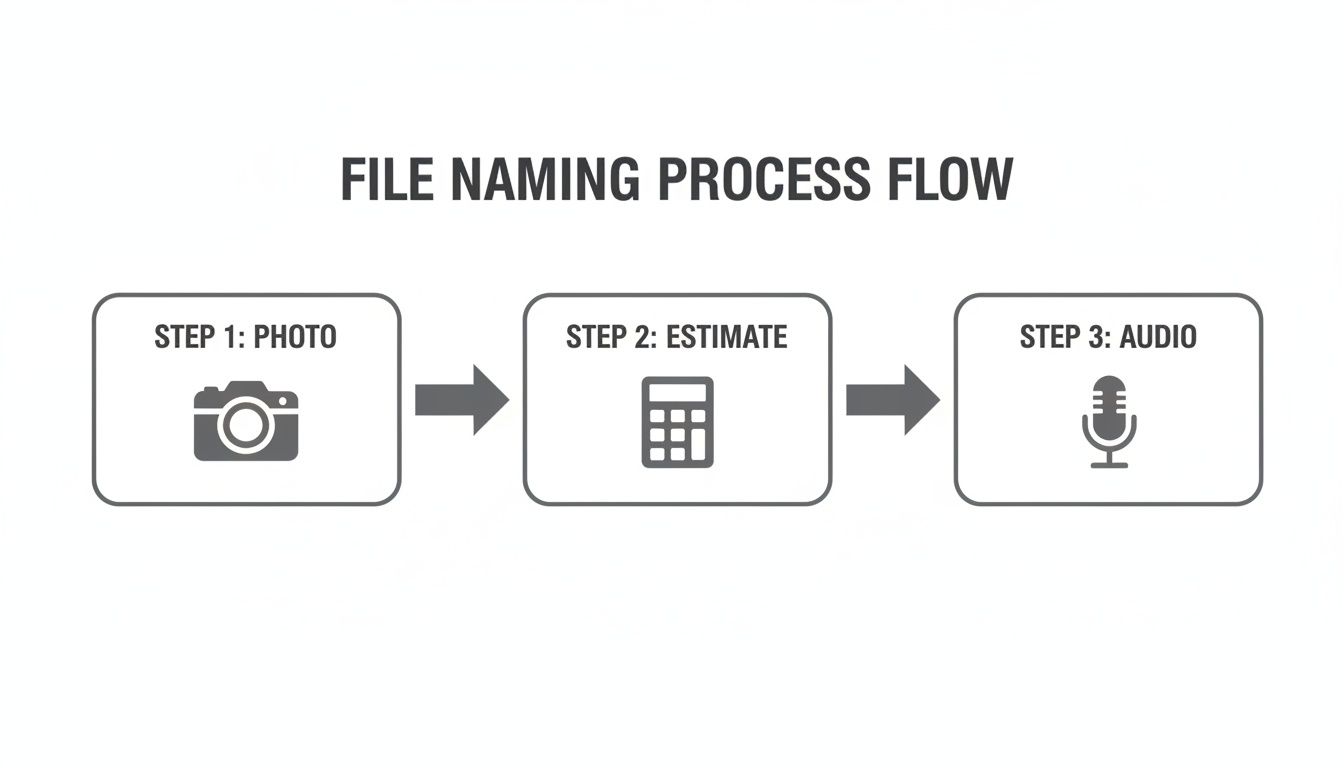
The visual makes it clear: a unified system processes every piece of evidence, regardless of its original format, into a consistent, logical structure.
Automation: The Engine of Consistency
Relying on manual enforcement is a recipe for failure. Your adjusters are focused on settling claims, not policing file names. This is where automation becomes your most valuable player, working tirelessly in the background to make sure every document conforms from the moment it arrives.
Modern claims intelligence platforms act as the central nervous system for this process. For instance, Wamy’s Evidence Refinery can automatically intercept and rename files from any source, whether it's an email attachment, a portal upload, or a third-party submission.
This AI-driven approach delivers a few huge wins:
Zero-Effort Compliance: Your team doesn’t have to memorize the rules. The system applies them automatically, ensuring every file is named correctly without adding a single click to their workflow.
Source Agnostic: It doesn’t matter if a vendor sends an invoice named
bill.pdfor a policyholder uploadsIMG_9876.jpg. The platform identifies, renames, and categorizes them correctly.Immediate Structure: Files aren't just renamed; they're instantly placed into the right context within the claim file, ready for triage and review.
This level of automation is the only way to maintain order at scale. It takes the burden of consistency off your team and puts it onto a system built for precision.
The Human Element: Driving Adoption
While automation handles the heavy lifting, successful implementation still hinges on human buy-in. You need to empower your team to understand and embrace the new system. This goes beyond sending a memo—it demands focused training and ongoing support.
A naming convention is a shared language. If only half the team speaks it, you still have miscommunication. The goal is fluency across the entire department.
Your training plan should be practical and show clear benefits. Demonstrate how a well-named file saves them time hunting for evidence and makes their job easier, especially during high-pressure CAT events.
To make it stick, put these steps into action:
Create a Living Document: Your token taxonomy guide should be the single source of truth, easily accessible on your company intranet or shared drive.
Run Hands-On Training: Use real-world examples from your own claims. Walk through naming different document types and, most importantly, explain the "why" behind each rule.
Appoint Team Champions: Identify influential team members who get it. These champions can act as advocates, provide peer support, and reinforce best practices on the ground.
By blending clear documentation with practical training, you can turn potential resistance into active participation.
Tackling the Legacy File Backlog
What about the years of inconsistently named files already clogging your system? The thought of a manual cleanup is overwhelming, but a phased migration makes it manageable. Trying to fix everything at once is a common mistake that just leads to burnout.
Instead, start with a targeted approach:
Prioritize Active Claims: Begin by applying the new conventions to all open and active claim files. This delivers immediate value and stops the backlog from getting any bigger.
Use Batch-Renaming Tools: For closed-but-recent claims, use batch-renaming software. These tools can apply your new logic to thousands of files at once, saving countless hours of manual work.
Archive Deep Legacy Files: For claims closed several years ago, it may be more practical to archive them in a separate, read-only location rather than renaming every single file.
This phased approach clears the path for a more organized future, and it's a critical step. Poor conventions contribute heavily to compliance costs. For instance, in major markets where P&C claims volume hit 300 million in 2024, disorganized files are linked to $3.8 billion in annual compliance expenses. Meanwhile, organized adopters see 50% faster audits. You can read more about how naming conventions impact information releases and compliance. To see how this fits into the bigger picture, check out our guide to integrated case management software in P&C claims.
Accelerate Triage and Audits with AI-Powered Naming
This is where your file naming strategy stops being about simple organization and becomes a true operational advantage. Think of your naming conventions as the essential foundation for high-speed automation. Once your data is structured, AI can finally do its best work, turning a good idea into real results that hit your bottom line.
A platform like Wamy uses your established taxonomy to create an intelligent, self-organizing claims environment. The AI-driven intake doesn't just collect incoming files—it actively sorts, categorizes, and structures them based on your rules. This takes the manual triage workload from hours down to just a few minutes for each claim.

Fueling Risk Intelligence with Structured Data
This newly structured data becomes high-octane fuel for advanced analytical tools. Wamy’s Risk Intelligence engine, for instance, gets a massive boost from consistent file naming. The system can instantly find and analyze critical evidence—like a specific repair estimate or a key witness statement—because the file's name tells the AI exactly what it is and where it belongs.
The immediate result is more accurate and reliable claim confidence scores, right from the start. Instead of an adjuster digging through a messy folder, the AI performs a first-pass assessment, flagging high-risk claims or identifying the straightforward ones ready for fast-tracking. It's a critical piece of a modern workflow, something we explore more deeply in our practical guide to AI document review for P&C claims.
The financial impact here is impossible to ignore. A 2023 report from the Corporate Finance Institute found that inconsistent file naming conventions cause 22% of teams to work with outdated data, which inflates settlement costs by an average of 15-20%. For Wamy users, this is where Risk Intelligence scores dramatically improve as the AI resolves ambiguities, helping claims resolve up to four times faster.
Proactive Problem Solving with Gap Detection
Beyond analysis, a smart naming convention unlocks proactive issue resolution. Wamy’s Gap Detection feature, for example, uses your naming patterns as a dynamic checklist to automatically flag missing documents. It knows that a claim with a repair invoice should probably have a corresponding repair estimate.
If that estimate is missing, the system flags it immediately. This simple alert prevents the claim from stalling for weeks until an adjuster finally notices the gap. This kind of automated oversight stops bottlenecks before they can even form, ensuring a much smoother claims journey.
This automated cross-referencing is nearly impossible with messy, ad-hoc file names. When estimate.pdf is all you have, a system has no context. But when it sees CL12345_2026-09-15_INV_Vendor-A.pdf and can't find CL12345_2026-09-10_EST_Vendor-A_v2.pdf, it can intelligently raise an alert.
The ultimate outcome of an AI-powered naming strategy is an 'always audit-ready' state. Every file becomes consistent, instantly searchable, and fully compliant by default, not by frantic, last-minute effort.
This state of readiness is the holy grail for claims operations and legal teams. When auditors request documentation, you can produce a complete, chronologically-ordered file in minutes. This not only satisfies compliance requirements with ease but also builds a defensible, irrefutable record of every action taken on the claim.
Ultimately, integrating smart file naming with an AI platform does more than just tidy up your digital folders. It builds a highly efficient, intelligent workflow that drives down cost-per-claim, accelerates resolutions, and empowers your team to make faster, more confident decisions.
Frequently Asked Questions About File Naming Conventions
Putting a new process in place, especially something as fundamental as file naming, is bound to bring up some real-world questions. It just happens. Think of this as your field guide for troubleshooting the most common challenges claims teams run into when they overhaul their file organization.
Getting ahead of these issues is the difference between a smooth rollout and a frustrating one. These are the questions that come up time and time again.
How Should We Handle Claims with Hundreds of Documents?
A single major loss—think a large commercial fire or a complex liability claim—can easily spawn hundreds, if not thousands, of documents. A flat folder with perfectly named files just won't cut it. It becomes a digital junk drawer. The real solution is to pair your naming conventions with a smart subfolder structure.
Break down your claim files with folders based on the document’s purpose. For example:
Photos: All visual evidence lives here. You can even get more granular with subfolders like
Initial-InspectionorPost-Repair.Invoices-Estimates: Consolidate all financial documents. This makes reviews and payment runs incredibly fast.
Legal-Correspondence: Isolate every letter, report, and legal filing related to the claim.
Statements: Centralize all recorded audio files and signed written statements from witnesses or policyholders.
This approach keeps the main claim folder tidy and lets adjusters zero in on specific types of evidence in seconds.
Your file naming convention tells you the what and when of a document. Your folder structure tells you the where. Using both is the secret to managing high-volume claims without getting lost in the noise.
What Do We Do with Poorly Named Files from Third Parties?
You'll never get every vendor, law firm, or policyholder to use your system. It's a fact of life. You're going to get files named invoice.pdf or IMG_5829.jpg. Trying to police the outside world is a battle you won't win.
Instead, create a digital staging area for all incoming third-party files. This is simply a dedicated folder inside each claim file, often labeled "Intake" or "To Be Processed."
When a new file arrives from an external source, it lands in this staging folder first. From there, an admin or an automated rule performs two simple actions:
Rename the file to match your established convention.
Move the renamed file into its correct subfolder (e.g., Photos, Invoices).
This workflow acts like a quarantine zone. It ensures no poorly named file ever contaminates your organized claim directory, standardizing every piece of evidence before it becomes part of the official record.
How Can We Get Resistant Team Members on Board?
Change is hard. You're guaranteed to have a few veteran adjusters who are perfectly happy with their "organized chaos." A top-down mandate is the least effective way to win them over. You have to answer their unspoken question: "What's in it for me?"
Don't frame the new system as more rules. Position it as a tool that gives them back time. Show them, don't just tell them, how consistent naming means:
Less time spent searching for that one critical photo or expert report.
More time to spend on high-value work, like negotiating a settlement or talking to a policyholder.
Zero stress during an audit or when handing off a file to a colleague.
Bring up a real-world scenario. Remind them of that time they spent a half-hour hunting for a misplaced estimate. Then, demonstrate how the new system finds it in under 10 seconds. When your team sees that organized files make their individual jobs easier, buy-in will happen organically.
A rock-solid file naming convention is the backbone of an efficient claims operation. When you combine this structure with an intelligent platform, you unlock even greater speed and accuracy. Wamy uses your standardized data to automate triage, detect missing evidence, and deliver audit-ready claim files from day one. Learn how Wamy can transform your claims workflow.