
Legal case management software is your digital command center for every document, deadline, and piece of evidence tied to a case. It's not just a place to dump files—it actively organizes information, turning a chaotic mess of data into a clear, actionable picture of your case.
Unpacking Your Digital Command Center
Ever tried solving a complex puzzle with pieces scattered across different tables, file cabinets, and a dozen email inboxes? That’s the daily reality for many claims adjusters and legal professionals. The problem isn't a lack of information; it’s the monumental task of piecing it all together into a story that holds up.
This is the exact problem legal case management software was built to solve.
Think of it like the difference between a self-storage unit and an intelligent warehouse system. A storage locker—like a basic cloud drive—holds your boxes, but you still have to dig through them yourself. An intelligent warehouse, on the other hand, knows what’s in every box, where it is, and how it connects to everything else. That's what a modern case management platform does for your legal and claims files.
From Data Overload to Actionable Insight
These platforms create a single source of truth for a case, ending the frantic search for that one critical document or email chain you know you saw somewhere. By bringing everything into one place, they lay the foundation for smarter, faster work. But the real power is in what they do with that data. The software stops being a passive folder and becomes an active partner in managing the case.
This shift from passive data storage to active information management is what separates the top-performing legal and claims teams from the rest. It’s about freeing up professionals to focus on strategy and decision-making, not administrative grunt work.
Modern systems use artificial intelligence to automate the tedious work that eats up hundreds of hours. For instance, the software can:
Categorize evidence: Automatically tag photos, medical records, and police reports the moment they’re uploaded.
Flag missing information: Spot gaps in a claim file, like a missing signature on a crucial form, before it becomes a problem.
Track deadlines: Keep an eye on statutes of limitations and court filing dates to prevent a simple mistake from costing you the case.
Ultimately, legal case management software turns a sea of disorganized data into a structured, auditable, and complete case file. This gives P&C carriers, TPAs, and law firms the clarity they need to make faster, more confident decisions.
Essential Features of Modern Legal Case Management Software
Let's be honest: not all legal case management platforms are created equal. While many systems offer basic file storage, a truly powerful solution is defined by a specific set of features that actively drive efficiency and accuracy. Forget the buzzwords; these capabilities are the engine that transforms chaotic data into structured, defensible case files.
Think of it like a master mechanic's workshop. You wouldn't use a simple wrench to rebuild an engine. In the same way, you can't rely on generic cloud storage to manage the intricate details of complex claims and litigation.
This visual breaks down the core functions, showing how modern platforms centralize documents, manage critical deadlines, and make communication seamless.
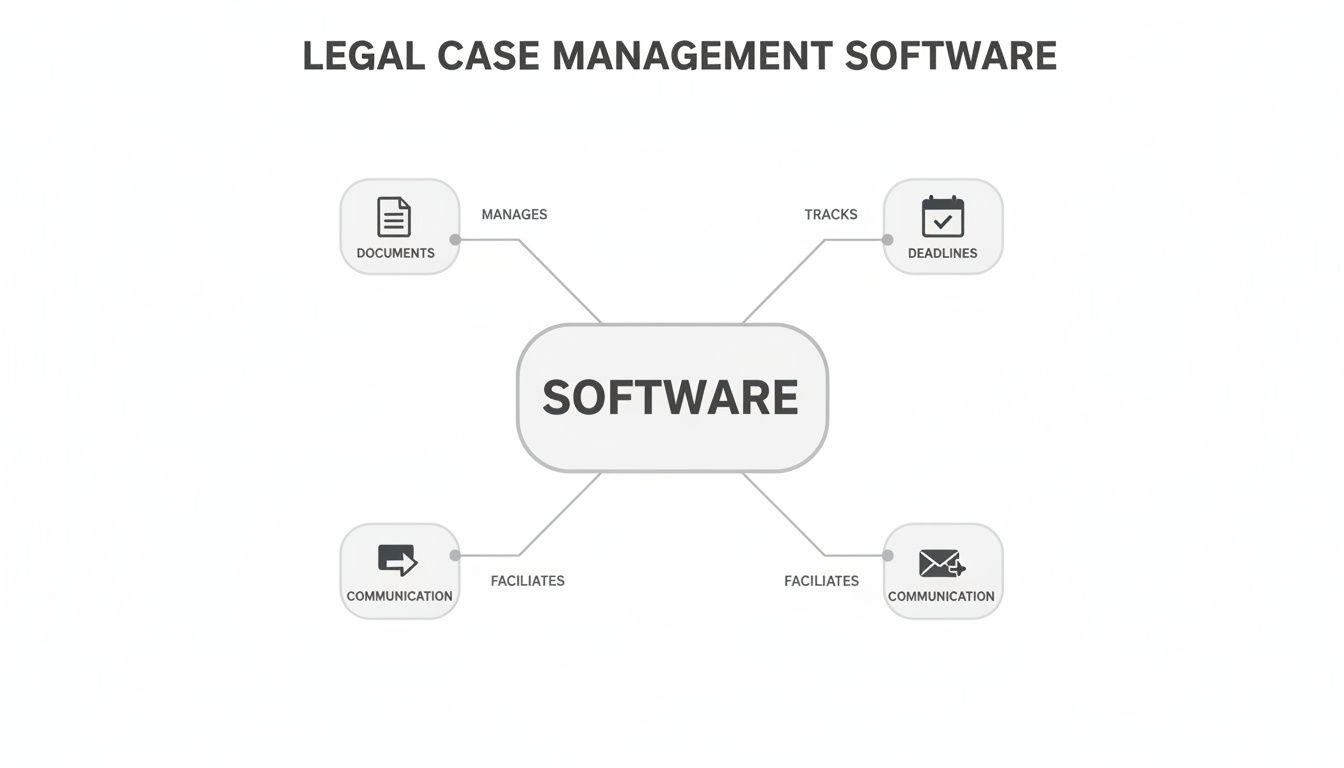
As you can see, the real power comes from connecting these once-separate tasks into a single, cohesive workflow, finally breaking down the information silos that slow everyone down.
Centralized Intake and AI Document Management
The first battle in any case is taming the flood of incoming information. A top-tier platform must have centralized intake, a feature that automatically pulls documents from emails, client portals, and direct uploads into one unified workspace. Instead of someone manually downloading and sorting attachments—and hoping nothing gets missed—the system does the heavy lifting.
Once everything is collected, AI-powered document management takes over. This is where the magic happens. The system uses artificial intelligence to actually read and understand every piece of evidence. A blurry photo from a crash scene is tagged as "Vehicle Damage," while a PDF is correctly identified as a "Medical Record," saving teams hundreds of hours of manual triage.
Workflow Automation and Evidence Tagging
With your documents neatly organized, the next step is managing the actual work. Workflow automation lets you build simple, rule-based systems for routing tasks, requesting approvals, and sending out notifications. For example, when a new medical bill is uploaded, the platform can automatically assign it to a claims adjuster for review and ping the legal team. No more chasing people for updates.
At the same time, evidence tagging empowers your team to build a clear, defensible case narrative from day one. Users can apply custom tags to documents, photos, and communications to link them to specific arguments or facts. This creates a detailed, interconnected web of evidence that’s easy to search and present, making it simple to see how every piece fits into the larger picture. You can explore how AI transforms the entire legal journey from intake to trial in our detailed guide.
To illustrate the difference, here's a quick look at how these tasks are handled with and without dedicated software.
Manual Case Management vs. Automated Software
Task | Traditional Manual Process | Automated Software Approach |
|---|---|---|
Document Intake | Manually downloading email attachments and uploading to shared drives. | Automatically ingests documents from multiple sources into a central case file. |
Evidence Review | A person reads every document to identify its type and relevance. | AI scans, categorizes, and tags documents based on their content (e.g., "Medical Bill," "Police Report"). |
Task Assignment | Sending emails or messages to assign reviews and follow-ups. | Automatically triggers tasks and sends notifications based on predefined rules. |
Building a Timeline | Manually creating a chronology of events in a separate document. | Dynamically builds an interactive timeline as tagged evidence is added to the file. |
Audit & Reporting | Sifting through email chains and file versions to prove who did what. | Provides an instant, unchangeable log of every action taken by every user. |
The contrast is stark. One path is bogged down by administrative friction, while the other clears the way for strategic, high-value work.
Complete Audit Trails and Enterprise Security
In the highly regulated worlds of insurance and law, being able to prove compliance is non-negotiable. A complete audit trail is an absolute must-have, recording every single action taken within the platform. Every document view, edit, tag, and approval is logged with a user ID and a timestamp, creating a permanent, unalterable record of the case lifecycle.
A complete and unchangeable record is the bedrock of compliance. An audit trail proves not just what happened, but also who did it and when, providing an unshakeable defense against regulatory scrutiny.
Finally, none of these powerful features matter without ironclad protection. Enterprise-grade security is the foundation everything else is built on. This means looking for certifications like SOC 2 and HIPAA readiness, which prove a provider’s commitment to safeguarding sensitive information through rigorous, third-party-audited controls.
These security measures are now table stakes for any software handling confidential legal or claims data. This dedication to security and efficiency is fueling the legal tech market's rapid expansion, with projections showing a jump from USD 2.57 billion in 2024 to USD 2.84 billion in 2025. This growth is driven by platforms that deliver real, measurable gains—like collecting claim documents up to 77% faster and accelerating case resolution by up to 4x, directly impacting an organization's bottom line.
The Core Benefits for Carriers, TPAs, and Law Firms
Powerful features are one thing, but what really matters is how they translate into business results. For P&C carriers, third-party administrators (TPAs), and law firms, putting the right legal case management software in place isn’t just a tech upgrade—it fundamentally improves outcomes. The benefits create a ripple effect across the entire claims and litigation lifecycle, delivering real gains in speed, accuracy, and compliance.
Think about a sudden surge in claims after a major storm. Trying to process thousands of documents by hand would create an impossible logjam. A modern platform cuts through that chaos, turning it into a manageable workflow that directly boosts both the bottom line and team morale.

Accelerated Resolution Times
The first and most obvious win is a huge drop in the time it takes to close a case. By automating intake and using AI to triage documents, teams can skip the administrative gridlock that slows everything down. Instead of wasting days sorting emails and naming files, adjusters can get straight to evaluation and settlement.
This speed has an immediate financial impact. Faster claim cycles lead to a lower average cost-per-claim and reduced operational overhead. It’s no secret that administrative drag is a major pain point; one recent survey found that 47% of legal professionals spend too much time on admin tasks. Automation tackles this head-on, freeing up your best people to do the work that actually matters.
The goal is to shrink the timeline between first notice of loss and final resolution. Every day saved is a direct cost saving and a step toward better client satisfaction.
Enhanced Decision Confidence
Making the right call—whether to approve a claim, escalate it, or get ready for a fight—hinges on having the complete picture. AI-driven risk scoring and gap detection tools deliver that clarity. The software essentially acts as a second set of eyes, flagging missing documents or inconsistent details that a human might easily miss during a manual review.
This builds confidence at every level. Adjusters can make faster, more consistent decisions because they have a holistic view of the evidence. For managers and legal teams, it means fewer errors and a more predictable, data-driven way to assess risk. This is the core of modern claims handling, which is why understanding property and casualty claims case management best practices is so critical for any team looking to stay ahead.
Bulletproof Auditability and Compliance
In an industry this regulated, your process has to be as defensible as your decisions. Legal case management software builds a centralized, unchangeable audit trail that documents every single action taken on a file. Every document viewed, note added, or approval given is automatically logged with a user ID and timestamp.
This creates an unassailable record for both internal audits and regulatory inquiries. Instead of scrambling to piece together a timeline from scattered emails and file notes, teams can generate a full report in seconds. This kind of transparency doesn't just ensure compliance with standards like SOC 2 and HIPAA; it builds a foundation of trust and accountability across the organization. You're left with a structured, consistent process that can stand up to the toughest scrutiny.
How to Choose the Right Legal Case Management Software
Picking the right legal case management software is a huge business decision, one that will define your team’s daily grind and your organization's ability to grow. It’s tempting to just compare feature checklists, but that’s a rookie mistake. The real goal is to find a solution that plugs directly into your biggest operational headaches, whether that’s a painfully slow document intake process or a chaotic approach to triaging new cases.
Think of it like hiring a key employee. You wouldn't just glance at a resume; you’d sit down for a real conversation to see if they have the right skills, fit the culture, and can actually work with your existing team. Evaluating software is no different—you need to look past the sales pitch and figure out how it will perform in your unique environment.
Define Your Core Evaluation Criteria
Before you even think about scheduling a demo, you need to lock down your non-negotiables. These criteria are the foundation of your search, making sure any platform you consider actually lines up with where you want to go. Without clear standards, it’s all too easy to get wowed by a slick interface that doesn't solve any of your real problems.
Your evaluation should stand on three key pillars:
Integration Capabilities: How well does this new tool play with your existing tech? A platform that can’t talk to your claims management system or accounting software just creates more data silos, completely defeating the purpose of getting a unified system in the first place.
Compliance and Security: Was the software built to handle the intense scrutiny of our industry? Look for providers who have gone through third-party audits like SOC 2 or are HIPAA ready. These aren't just buzzwords; they're proof of a serious commitment to protecting sensitive client and case data.
Scalability and Performance: Can this platform keep up as you grow? You need to know if the software can handle a massive surge in claims after a catastrophe or support your firm as you expand into new practice areas without slowing to a crawl.
Choosing the right software isn't about finding the platform with the most features. It's about finding the right features that solve your specific bottlenecks. A system that automates your biggest administrative headaches will always deliver a better return than one with a dozen functions you'll never touch.
Calculate a Realistic Return on Investment
A classic mistake is getting fixated on the subscription price. A true ROI calculation goes way beyond the sticker price to measure the software's real-world impact on your team's efficiency and output. The best platforms often pay for themselves many times over by slashing administrative overhead and getting cases closed faster.
To build a business case that holds up, you have to quantify the potential gains. Start by asking some pointed questions:
How many hours a week do our adjusters waste on manually sorting documents?
What’s our average cost-per-claim, and how much would faster resolutions shave off that number?
Could we handle a higher caseload with the same team if automation took care of the grunt work?
Recent industry surveys revealed that a staggering 47% of legal professionals feel they spend too much time on administrative tasks. By automating that busywork, you’re not just saving time—you’re freeing up your most valuable people to focus on high-value work like strategy, negotiation, and analysis. This is where the true value of modern legal case management software shines, turning what looks like a simple purchase into a strategic investment that delivers real, measurable results.
A Roadmap for Successful Implementation
Let’s be honest: great software is useless if your team doesn't embrace it. Rolling out new legal case management software is far more than a technical switch—it’s a fundamental change in how your people get their work done. Without a clear roadmap, even the best platform will fail to deliver, which is why a thoughtful plan is non-negotiable for getting everyone on board and unlocking its true potential.

The real work begins long before anyone hits "go-live." It’s all about demystifying the technology and focusing on the human side of the transition. Ultimately, success hinges on earning buy-in from the adjusters, paralegals, and attorneys who will live in this system every single day.
Navigating Key Implementation Stages
A successful deployment isn't a single event. It’s a series of well-managed steps, each one designed to tackle a specific challenge—from moving decades of old data to configuring the system to match your unique way of working. Skip the planning, and you’re inviting a chaotic rollout that breeds frustration and undermines the whole project.
To sidestep that mess, your implementation plan needs to nail three core activities:
Strategic Data Migration: This is about more than just moving files. It involves a meticulous plan to transfer existing case data, documents, and contacts from old, clunky systems into the new platform without dropping a single critical piece of information.
Effective Team Onboarding: Forget boring, button-clicking tutorials. Real training shows users how the software solves their biggest daily headaches, whether it's hunting for a specific document or chasing down an approval.
Custom Workflow Configuration: The software should bend to your process, not the other way around. This step is where you set up automated rules and task assignments that mirror—and improve—your team's established workflows.
Securing Buy-In with a Pilot Program
Change management is the most critical—and most frequently botched—part of any software implementation. The absolute best way to win over skeptics isn’t with a memo from leadership; it's by proving the software’s value firsthand. This is where a pilot program becomes your most powerful tool.
A pilot program is a low-risk, high-reward strategy. It lets you test the platform with a small, focused team, prove its value with real-world results, and iron out the kinks before a company-wide deployment.
When you start small, you can gather honest feedback, create internal champions, and build an undeniable business case based on actual performance metrics. Think about it: when the rest of the team sees the pilot group closing cases faster and spending less time on tedious admin work, resistance quickly turns into genuine curiosity. This approach transforms a top-down mandate into a bottom-up movement, making sure your investment delivers the results you were promised.
Where Legal and Claims Management is Headed
The worlds of legal and claims management are changing fast, and it’s all thanks to big leaps in AI and automation. For a long time, adopting new software was about doing things a little faster. Now, it’s a matter of survival.
The market for legal case management software is exploding—some analysts see it hitting $5.9 billion by 2033, growing at a 13.4% clip each year. You can dig into the numbers and what’s driving this growth over at scoop.market.us. This isn't just a trend; it's a fundamental shift.
Smart platforms are no longer just digital filing cabinets. They're becoming proactive partners that guide decisions, spot risks in evidence, and put routine workflows on autopilot. The firms and carriers getting on board now are building a serious lead over the competition.
The future isn’t about working harder; it’s about working smarter. AI-powered platforms are becoming essential co-pilots, empowering legal and claims professionals to achieve better outcomes with greater speed and confidence.
It's a good time to take a hard look at your current processes. The real question is how you can put these AI-driven tools to work for you, not just for today, but for what's coming next. To get a better handle on the changes ahead, check out our guide on the top 2025 trends in claims management and automation.
Still Have Questions? Let's Clear a Few Things Up
Diving into legal case management software can feel overwhelming, so let's tackle some of the most common questions we hear from carriers, TPAs, and law firms.
How Is This Different From Simple Document Storage?
That’s a great question, and the difference is massive. While a system like Dropbox or a shared network drive is just a digital filing cabinet—a passive place to dump files—legal case management software is an active, intelligent workspace.
It doesn’t just store your documents. It organizes them, tags key evidence, connects them to specific tasks, and builds an unbreakable audit trail showing who did what and when.
Think of it this way: document storage is the messy evidence box. A case management platform is the senior paralegal who sorts through that box, organizes everything into labeled binders, flags what's missing, and reminds you that your statute of limitations is approaching.
Modern platforms take it even further by using AI to automatically categorize documents and tag critical evidence, giving you a level of insight that a simple folder structure could never match.
Is This Kind of Software Only for Huge Companies?
Not anymore. It’s a common misconception that only massive enterprises can afford or benefit from this technology. The reality is, with today's cloud-based solutions, there are flexible, affordable options perfect for smaller law firms, boutique TPAs, and even independent adjusters.
In fact, the efficiency boost from automating tasks like intake and triage can be a huge competitive advantage for smaller teams. It lets them punch well above their weight, handling a much higher volume of cases without needing to add more staff.
What's Involved in Getting This Set Up? Is It a Headache?
Implementation can vary, but today’s cloud platforms are a world away from the painful, months-long rollouts of old legacy systems. Most leading providers have a well-oiled process for onboarding, helping you migrate data, and training your team.
A smart way to start is with a pilot program. Pick one team or a specific type of case and get them running on the new system first. This approach is fantastic for working out any kinks, demonstrating a clear ROI to leadership, and building momentum for a smooth, company-wide transition.
Ready to turn chaotic claims data into confident, audit-ready decisions? See how Wamy can accelerate your case resolutions and lower costs. Explore our AI claims intelligence platform today.